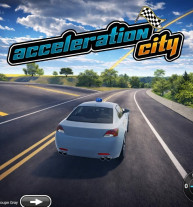
Acceleration City isn’t just another racing game — it’s an interactive playground where speed meets creativity. From high-flying stunts to programmable robot partners, this unique driving experience blends arcade fun with hands-on coding mechanics in a way that feels natural and exciting.
If you’re looking for a game that mixes racing, exploration, and smart problem-solving, Acceleration City delivers something truly different.
At first glance, Acceleration City looks like a colorful stunt-racing adventure. You choose a vehicle, hit the terrain, and compete in races across wild environments filled with jumps, ramps, and hidden paths.
But what sets the game apart is your robotic companion — the Cobot.
Every vehicle comes equipped with a personal Cobot that you can program to generate helpful structures like:
Ramps
Platforms
Boost pads
This means you’re not just driving through the world — you’re actively shaping it.
Beyond racing, exploration plays a huge role. As you travel through forests, open landscapes, and stunt-heavy tracks, you’ll discover collectible creatures called Minanimals. Finding them often requires clever use of your Cobot’s abilities.
Some areas can only be reached by generating the right ramp at the right time. Others require precision driving and smart positioning. The mix of exploration and racing keeps gameplay fresh and rewarding.
Acceleration City was co-designed by researchers at Carnegie Mellon University and students from the Boys and Girls Clubs of Western Pennsylvania as part of the Player-Programmed-Partner Games (P3G) project.
The idea behind the game is simple but powerful: introduce coding and computational thinking in a fun, accessible way.
Players can program their Cobot to:
Respond to specific key presses
Activate inside colored trigger zones
Assist during races automatically
Instead of abstract coding lessons, you see your commands come to life instantly on the track.
Here’s a quick breakdown of the main controls:
W / A / S / D – Drive
Spacebar – Handbrake
C – Change camera
Number keys – Programmable actions
P – Program Cobot
Enter – Reset car
F – Slow motion
The layout makes it easy to switch between racing and programming without interrupting the flow.
There are many other games developed under Wordle NYT, let's try them out